
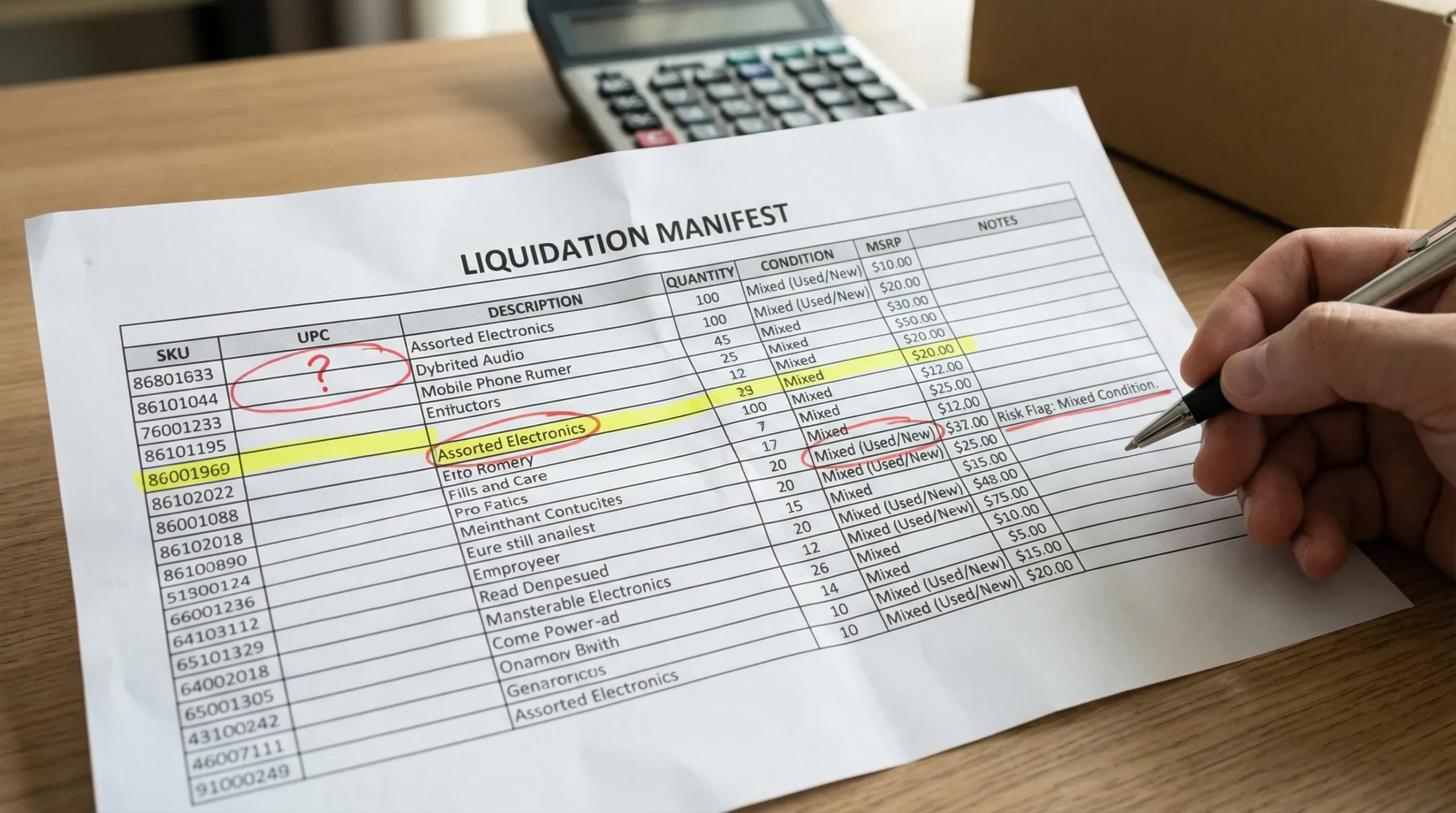
A manifest can be the difference between a repeatable, profitable buy and a cash-trap pallet that eats your time. But most new buyers read manifests the wrong way: they focus on MSRP, assume condition labels are standardized, and miss the small fields that predict labor, returns, and sell-through.
This guide breaks down how to read a manifest for wholesale liquidation pallets, what each column really tells you, and how to turn a spreadsheet into a realistic buy decision.
What a liquidation manifest is (and what it is not)
A manifest is a document (usually a spreadsheet or PDF) that lists what a pallet, lot, or truckload is supposed to contain. Depending on the source, it might be:
- Item-level (each line is a sellable unit or SKU)
- Case-level (each line is a case pack, not individual units)
- Category summary (counts by department, with limited item detail)
- Unmanifested / blind (no SKU list, sometimes only a general description)
A manifest is not a guarantee of exact contents or condition. Liquidation inventory often comes from returns, shelf-pulls, or mixed handling, and errors happen. Your goal is to treat the manifest like underwriting data: good enough to model risk, not perfect enough to bet your business on.
If you want a broader overview of how grade and load type affect profit, reference this companion guide: Liquidation Pallets: Grades, Loads, and Real Profit Examples.
Common manifest columns (and how to interpret them)
Most manifests reuse the same building blocks, even when column names vary. Here is what matters and what to watch for.
| Manifest field | What it usually means | What resellers should check |
|---|---|---|
| Item description | Text label for the product | Descriptions can be shortened, generic, or inconsistent. Normalize terms (example: “BT SPKR” = Bluetooth speaker). |
| SKU / Retailer SKU | Retailer’s internal item code | Useful for matching the exact variant (size, color). Sometimes more reliable than description text. |
| UPC / EAN / GTIN | Barcode identifier | Best for pulling comps and exact matches. Validate format using GS1 barcode standards when a UPC looks “off.” |
| Quantity | Unit count for that line | Confirm whether it is units or cases. A case pack line can make quantities look bigger than reality. |
| MSRP / Retail | Manufacturer or retailer retail price | Treat as marketing, not value. You need sold comps and recovery assumptions. |
| Condition / Grade code | Condition bucket (varies by supplier) | Condition labels are not standardized. Translate them into labor and expected recovery, not hope. |
| Category / Department | Product family (tools, apparel, home) | Helps forecast sell-through speed and return risk by your sales channel. |
| Cost / Extended cost | Sometimes included for invoicing | If present, confirm whether it is per unit, per case, or extended line total. |
| Weight / Dimensions | Shipping or handling data | Useful for freight planning and for spotting oversized items that hurt margins. |
| Location / Lot ID | Warehouse or internal lot reference | Needed for receiving audits and claims discussions. |
How to read a manifest in a repeatable way (a practical workflow)
A good manifest process is less about being “good at spreadsheets” and more about using the same steps every time so your pricing improves with experience.
Step 1: Confirm the unit of measure (units vs cases)
Before you price anything, confirm whether each line is:
- Eaches (individual units)
- Case packs (one line might represent 6, 12, or 24 units)
- Assorted / mixed case (harder to comp)
If a manifest does not state case pack, ask. If the seller cannot clarify, treat it as higher risk and price down accordingly.
Step 2: Clean the data so you can actually evaluate it
Most buyers underestimate how much profit comes from basic cleanup.
In a copy of the manifest:
- Standardize condition labels into your own buckets (example: “Returns”, “Open Box”, “New/Overstock”, “Salvage”) even if the supplier uses different terms.
- Create a “Comp-ready ID” column that prefers UPC, then retailer SKU.
- Add a notes column for labor multipliers (missing parts likely, testing required, oversized, hazmat).
This sounds simple, but it forces you to stop reading the manifest like a catalog and start reading it like a processing plan.
Step 3: Stop using MSRP as value, use “lane value” instead
MSRP is almost never the number you will realize. What you want is lane value, meaning what that item is worth in your selling lane:
- Amazon or eBay (after fees, shipping, returns)
- Facebook Marketplace / flea market (lower price, faster turn)
- Bin store or discount retail (batch pricing)
- Parts/salvage (lowest value, fastest exit)
If you do not have time to comp every line, sample your top value drivers:
- Top 10 lines by MSRP (often where the risk hides)
- Any line with high quantity
- Any line with electronics, batteries, or branded tools
Step 4: Translate condition into labor and recovery (not optimism)
Condition is where most pallet beginners lose money. The mistake is thinking “customer return” means “like new.” In liquidation, it often means “unknown until processed.”
Build a simple internal translation table that matches your real workflow. Example (illustrative only, you should calibrate to your own results):
| Supplier label (example) | What it often means in practice | Typical workflow impact |
|---|---|---|
| New / Overstock | Unused, may have shelf wear | Fast list or fast local sell |
| Open Box | Packaging opened, may be complete | Quick inspection, accessory check |
| Customer Returns | Mixed, may be incomplete or used | Triage, testing, higher shrink |
| Salvage / As-Is | Damaged or non-working likely | Parts, bundles, disposal planning |
If you mainly sell online, your “returns” labor is usually higher than a local flea market operator’s labor because you need accurate condition notes, functional testing, and better packing.
For a deeper look at what “customer return” can include, see: Amazon Pallets Returns: What “Customer Return” Really Means.
Step 5: Identify restricted, hazmat, and high-friction items early
Some products are not “bad,” but they are margin-hostile if you do not have the right lane.
Watch for:
- Lithium batteries (shipping constraints, damage risk). If you ship hazmat, reference PHMSA hazmat guidance and set stricter receiving checks.
- Personal care and topical products (seals, expiration dates)
- Infant items (recall risk and marketplace restrictions)
- Large TVs and monitors (freight damage, high return rate)
- Accessories-dependent items (tools missing batteries, vacuums missing parts)
A manifest that does not clearly identify these categories deserves a lower max buy price.
Step 6: Build a “max buy price” from recovery, not from retail
You do not need a perfect model. You need a consistent one.
A simple approach:
| Input | What it represents | How to estimate from the manifest |
|---|---|---|
| Expected gross sales | Total revenue you can realistically sell for | Use lane value for key SKUs, then extrapolate |
| Shrink and unsellables | Items you cannot sell or must discount heavily | Increase shrink if condition is mixed or UPCs are missing |
| Processing costs | Labor, supplies, testing, disposal | Higher for returns, electronics, missing parts |
| Landed freight | Shipping, liftgate, appointments | Quote before buying when possible |
| Target profit | The margin you need to make it worth it | Set a minimum dollar profit per pallet or per load |
Then:
Max Buy Price = Expected gross sales − (shrink + processing + landed freight + target profit + risk buffer)
Your risk buffer is where experience shows up. Early on, your buffer should be bigger because you do not yet know your true recovery rates.
If you want a structured checklist that ties the manifest to freight and receiving realities, this pairs well with: Truckload Liquidation Checklist: From Quote to Delivery.
Manifest red flags that experienced buyers price down
Some issues are not deal-breakers, but they should change your bid.
| Red flag | Why it matters | What to ask the supplier |
|---|---|---|
| Many lines missing UPCs | Harder to comp, higher mis-ID risk | “Can you provide UPCs or retailer SKUs for these lines?” |
| Vague descriptions (example: “ASSORTED ITEMS”) | Often hides mixed, low-value, or incomplete goods | “Is there a more detailed breakdown or photos?” |
| Condition is one label for everything | Usually means condition is not inspected | “How is condition assigned, and is it verified?” |
| MSRP looks inflated vs reality | Common in liquidation marketing | “Do you have historical recovery guidance for this category?” |
| High-value electronics mixed with low-value accessories | Drives labor and return risk | “Any testing done, or sold as untested?” |
| Unit counts do not match pallet count expectations | Suggests case packs or manifest errors | “Is quantity eaches or cases, and what is average units per pallet?” |
A good supplier should be able to answer these questions clearly. If you want a broader question list for any purchase, use: Pallets Store Guide: What to Ask Before You Buy.
Pallet manifests vs truckload manifests (what changes)
Manifests often get less precise as you scale:
- Single pallets are more likely to have item-level manifests (or at least tighter category grouping).
- Truckloads may include merged manifests across pallets, repeated SKUs, or higher rates of “assorted” labeling.
That does not mean truckloads are worse. It means you should plan for:
- More sorting time
- More variance in recovery
- More need for space and process discipline
If you are deciding whether to scale, this overview helps: Direct Truckload Liquidations Explained.
Operational tip: store manifests so they are searchable later
Your real advantage as a reseller is not one great buy. It is building your own dataset of what you paid, what you recovered, and what conditions actually meant.
A few practical habits:
- Save every manifest with a consistent file name (date, supplier, lot ID).
- Add your final results later (sell-through %, average selling price, shrink notes).
- Keep related emails and documents together so claims and audits are easier.
If you run purchasing with a team, or you are building lightweight automation, it can help to route manifests and vendor emails through a dedicated inbox. Tools like Mailhook’s programmable disposable inboxes can make it easier to capture incoming messages and structure them for internal workflows.
Frequently Asked Questions
What is a manifest for wholesale liquidation pallets? A manifest is a list of the items (or categories) expected in a pallet, lot, or truckload. It usually includes identifiers like SKU or UPC, quantities, and sometimes condition and MSRP.
Can I trust a liquidation manifest? You should treat it as a best-effort inventory list, not a guarantee. Errors, substitutions, and condition variation can happen, especially with customer returns and mixed lots.
What matters most on a manifest when buying pallets for resale? UPC or SKU accuracy, quantity clarity (units vs cases), condition information, and whether the item mix fits your selling lane. MSRP matters far less than real comps and processing cost.
How do I price a liquidation pallet using a manifest? Estimate what you can realistically sell (lane value), subtract shrink, processing costs, landed freight, and your required profit, then add a risk buffer. The remainder is your max buy price.
What if a pallet is unmanifested? Price it as higher risk, request photos or category breakdowns, and only buy if your margins can absorb unknowns. Unmanifested lots can work best when you have a fast local lane and strong sorting workflow.
Buy manifested wholesale liquidation pallets with support
If you are ready to buy wholesale liquidation pallets with a clearer view of what you are getting, American Bulk Pallets supplies pallets and direct truckload liquidations with manifests and shipping options for U.S. buyers.
Browse available inventory and get help matching a load to your resale model at American Bulk Pallets.